
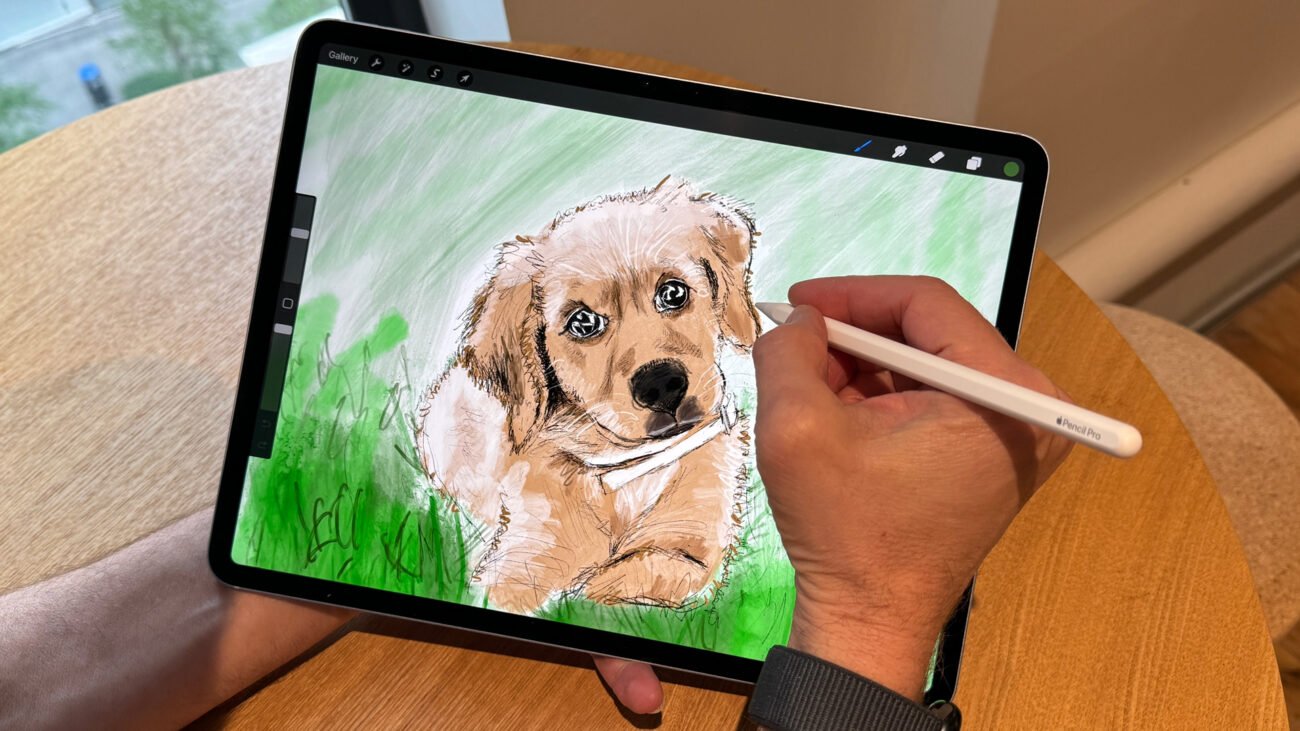
Starting digital art can feel overwhelming without the right tools. But imagine having a tablet that feels just like paper—smooth, natural, and easy to use. Choosing the right graphics tablet can turn those struggles into pure joy. It helps you bring your creativity to life every day, making drawing, designing, or editing so much easier and more fun.
In this guide, we’ll explore some of the best graphics tablets for beginners. Whether you want a simple, affordable option or a tablet with a screen that shows your work directly, we’ve got you covered. Keep reading to find the perfect tablet that fits your style and needs.
1. Xppen Drawing Tablet Artist13.3 Pro

The XPPen Drawing Tablet with Screen Full-Laminated Graphics Drawing Monitor Artist13.3 Pro is ideal for digital artists, graphic designers, and illustrators seeking a high-quality, responsive drawing experience. Whether you are a beginner looking to improve your skills or a professional needing precision and color accuracy, this tablet offers features that cater to a wide range of creative needs.
Pros:
- 8192 levels pen pressure sensitivity for precise and natural drawing.
- Full-laminated screen reduces parallax for accurate pen positioning.
- Adjustable stand for comfortable viewing angles during long sessions.
- 8 customizable shortcut keys improve workflow efficiency.
- 123% sRGB color gamut ensures vibrant and true-to-life colors.
Cons:
- Relatively heavy weight of 4.4 pounds may reduce portability.
- Limited color options available only in black or white.
- Screen size of 13.3 inches might feel small for some professional users.
The Artist13.3 Pro features a full-laminated display which significantly minimizes the gap between the pen tip and the cursor, enhancing accuracy and making the drawing feel more natural. The tablet’s 8192 levels of pen pressure sensitivity allow artists to create detailed strokes with varying thickness and opacity, closely mimicking traditional drawing tools. Additionally, the adjustable stand provides ergonomic comfort, reducing strain during extended use.
With a vibrant 123% sRGB color gamut, this tablet displays colors vividly and accurately, crucial for artists who require color precision in their work. The inclusion of 8 customizable shortcut keys enables users to streamline their workflow, accessing frequently used functions quickly. Overall, the XPPen Artist13.3 Pro offers a balanced combination of performance, comfort, and color fidelity, making it a valuable tool for creative professionals and enthusiasts alike.
To buy this product, click here.
2. Gaomon M10k Drawing Tablet

The GAOMON M10K Drawing Tablet is ideal for digital artists, graphic designers, and creative professionals seeking a reliable and responsive tool for their work. It is perfect for those who want a large, versatile drawing surface with customizable controls, whether they are beginners or experienced users working on Mac, Windows, or Android platforms.
Pros:
- Large 10×6 inch active area providing ample space for detailed artwork.
- 8192 levels of pressure sensitivity for precise and natural drawing experience.
- Battery-free stylus ensures uninterrupted creativity without charging hassles.
- 10 customizable hot keys and a touch ring for quick access to shortcuts and enhanced workflow.
- Lightweight and slim design (1.53 pounds and 0.41 inches thick) for comfortable portability.
Cons:
- May require a learning curve for users new to drawing tablets.
- Limited color options, available only in black.
- Some features may have limited compatibility depending on the specific Android device.
The GAOMON M10K offers a spacious working area of 10 by 6 inches, which is ideal for artists who need room to express detailed designs and sketches. The tablet’s high pressure sensitivity with 8192 levels allows for smooth, accurate lines and shading, closely mimicking traditional drawing tools. The battery-free stylus adds convenience by eliminating the need for charging, enabling longer uninterrupted creative sessions.
Additionally, the tablet’s 10 customizable hot keys and touch ring significantly enhance productivity by providing quick access to frequently used functions and commands. This setup helps streamline the creative process, making it easier to switch tools and adjust settings without interrupting the workflow. Compatible with multiple operating systems, including Mac, Windows, and Android, the GAOMON M10K is a versatile device suitable for a wide range of creative projects.
To buy this product, click here.
3. Xppen Updated Deco 01 V3 Drawing Tablet

The XPPen Updated Deco 01 V3 Drawing Tablet is ideal for digital artists, graphic designers, educators, and gamers who seek a versatile and responsive drawing pad. Whether you are a beginner or a professional, this tablet offers precision and ease of use, making it perfect for creating digital art, teaching online, or enhancing gaming experiences on multiple platforms including Chrome, PC, Mac, and Android.
Pros:
- Equipped with 16384 levels of pressure sensitivity for precise and natural drawing strokes.
- Features a battery-free stylus, eliminating the need for charging and ensuring uninterrupted creativity.
- 10×6 inch active area provides ample space for detailed artwork and smooth navigation.
- Includes 8 customizable hotkeys for quick access to frequently used functions, enhancing workflow efficiency.
- Compatible with multiple operating systems, including Windows, Mac, Android, and Chrome OS.
- Lightweight and slim design (only 2.2 pounds) makes it highly portable.
Cons:
- May require a learning curve for users new to graphic tablets.
- Does not include a display screen, so users must look at their monitor while drawing.
- Limited color options, only available in black.
The XPPen Updated Deco 01 V3 stands out for its exceptional pressure sensitivity and battery-free stylus, which together deliver a natural and fluid drawing experience. The large active area of 10×6 inches allows users to work comfortably on detailed projects without feeling constrained. Its compatibility with multiple operating systems ensures that artists and professionals can seamlessly integrate it into their existing setups, whether they use a PC, Mac, or even an Android device.
Additionally, the inclusion of 8 customizable hotkeys empowers users to streamline their workflow by assigning shortcuts to commonly used commands, saving valuable time during creative sessions. The tablet’s lightweight and sleek design make it highly portable, perfect for artists on the go or educators conducting online classes. Overall, the XPPen Deco 01 V3 is a versatile and affordable tool that caters to a wide range of creative and professional needs.
To buy this product, click here.
4. Huion Inspiroy H640p Drawing Tablet

The HUION Inspiroy H640P Drawing Tablet is ideal for digital artists, graphic designers, illustrators, and educators who need a reliable and portable tool for creative work. Whether you are a beginner looking to explore digital art or a professional seeking a compact tablet for on-the-go projects, this device offers an excellent balance of performance and affordability. It is also well-suited for students and teachers involved in digital teaching and presentation tasks.
Pros:
- Battery-free stylus with 8192 levels of pen pressure for precise and natural drawing experience
- Compact 6×4 inch active area suitable for portability and ease of use
- Six customizable hot keys for quick access to frequently used functions
- Compatible with Mac, PC, and mobile devices, ensuring versatile usage
- Lightweight design weighing only 0.6 pounds, making it easy to carry
Cons:
- Smaller active area may feel restrictive for users accustomed to larger tablets
- Limited to black color option, which may not appeal to all users
- Does not include a display, requiring a separate monitor for visual feedback
The HUION Inspiroy H640P features a highly responsive battery-free stylus with 8192 levels of pressure sensitivity, allowing artists to create detailed and nuanced artwork with ease. The pen’s natural feel and accuracy make it perfect for drawing, writing, and design tasks. Additionally, the tablet’s six customizable hot keys enhance workflow efficiency by enabling quick access to shortcuts, which is particularly beneficial for professionals and students who require speed and productivity.
Designed with portability in mind, the tablet’s slim profile and lightweight construction ensure it can be easily transported between home, school, or office. Its compatibility with multiple operating systems including Mac, PC, and mobile devices makes it a flexible choice for users working across different platforms. Overall, the HUION Inspiroy H640P offers a powerful, user-friendly digital art experience at an affordable price point, making it a valuable tool for creative individuals and educators alike.
To buy this product, click here.
5. Wacom Intuos Small Graphics Drawing Tablet

The Wacom Intuos Small Graphics Drawing Tablet is ideal for beginners, students, and creative professionals who seek a compact and versatile drawing device. Perfect for those who want to enhance their digital art skills or need an intuitive tool compatible with multiple operating systems such as Chromebook, Mac, Android, and Windows. This tablet is also excellent for anyone interested in photo editing, graphic design, or digital note-taking.
Pros:
- Includes training and software to help users get started quickly
- 4 customizable ExpressKeys for improved workflow and productivity
- Compact and lightweight design for easy portability
- Compatible with multiple platforms including Chromebook, Mac, Android, and Windows
- High precision pen input with natural drawing experience
Cons:
- Smaller active area may not suit users who prefer larger drawing surfaces
- Does not include a display screen, requiring connection to a computer or device
The Wacom Intuos Small Graphics Drawing Tablet features a sleek and lightweight design, making it highly portable for artists and designers on the go. Its compact size does not compromise on performance, providing a highly responsive pen with pressure sensitivity that offers precise control over lines and strokes. The tablet’s compatibility with a broad range of operating systems ensures flexibility for users regardless of their preferred device. The inclusion of customizable ExpressKeys enhances productivity by allowing quick access to frequently used shortcuts.
Additionally, the tablet comes bundled with training and software, making it easier for beginners to jump into digital art creation without a steep learning curve. This combination of hardware and software support ensures users can maximize their creativity and efficiency. Whether used for sketching, editing photos, or creating detailed designs, the Wacom Intuos Small is a reliable and user-friendly tool that caters to both novices and experienced digital artists alike.
To buy this product, click here.
6. Huion Kamvas 13 Drawing Tablet With Screen

The HUION Kamvas 13 (Gen 3) Drawing Tablet with Screen is ideal for digital artists, illustrators, and designers who seek a high-quality, portable, and responsive drawing device. Whether you are a beginner looking to improve your skills or a professional artist requiring precise control and vibrant color accuracy, this tablet offers the perfect blend of advanced features and ease of use. It is also suitable for those who prefer working across multiple platforms, including PC, Mac, and Android.
Pros:
- Features a 13.3″ full-laminated screen with Anti-Sparkle Canvas Glass 2.0 for reduced glare and improved drawing comfort.
- Offers 99% sRGB color gamut for vivid and accurate color reproduction.
- Equipped with PenTech 4.0 and 16384 levels of pen pressure sensitivity for precise and natural drawing strokes.
- Includes dual dial controls that enhance workflow and customization on PC, Mac, and Android devices.
- Lightweight and compact design with dimensions of approximately 14.17 x 7.87 inches and weighing less than 2 pounds, making it highly portable.
Cons:
- Screen size might be smaller than some professional artists prefer for large-scale projects.
- Compatibility with certain Android devices may require additional adapters or setup.
The HUION Kamvas 13 (Gen 3) is designed with a full-laminated screen that minimizes parallax and enhances the drawing experience by bringing your pen tip closer to the display surface. The Anti-Sparkle Canvas Glass 2.0 reduces reflections and glare, allowing for longer, more comfortable work sessions without eye strain. The tablet’s impressive 99% sRGB color accuracy ensures that the colors you see on the screen are vibrant and true to life, which is crucial for detailed artwork and color-sensitive projects.
Equipped with the latest PenTech 4.0 technology and an ultra-sensitive 16384 levels of pressure sensitivity, the stylus offers exceptional precision and responsiveness, enabling artists to create fine lines, shading, and textures with ease. The inclusion of dual dial controls provides quick access to customizable shortcuts, boosting productivity by streamlining common tasks. Its lightweight and sleek design make it a practical choice for artists who need to work on the go or in limited spaces without compromising performance.
To buy this product, click here.
7. Huion Kamvas Pro 16 Drawing Tablet

The HUION KAMVAS Pro 16 Drawing Tablet with Screen is ideal for professional artists, graphic designers, and digital illustrators who require a high-quality pen display for precise and comfortable drawing. It is also suitable for students and hobbyists looking to enhance their digital art skills with a reliable and versatile graphics tablet compatible with Windows, Mac, and Linux systems.
Pros:
- 15.6 inch anti-glare screen reduces eye strain and improves visibility in different lighting conditions
- Six customizable shortcut keys for increased productivity and workflow efficiency
- Adjustable stand allows for comfortable drawing angles and better ergonomics
- Compatible with multiple operating systems including Windows, Mac, and Linux
- Lightweight and portable design with dimensions of 17.24 x 9.88 x 0.47 inches and weight of 2.98 pounds
Cons:
- Screen size might be limiting for users who prefer larger drawing surfaces
- Learning curve for beginners unfamiliar with pen display tablets
- Some users may find the price higher compared to basic drawing tablets without a screen
The HUION KAMVAS Pro 16 features a vibrant 15.6-inch pen display with anti-glare glass, which ensures clear and comfortable viewing even during extended drawing sessions. Its precision pen technology supports natural pen pressure sensitivity, allowing artists to create detailed and nuanced strokes that mimic traditional drawing tools. The tablet’s compact and lightweight design makes it easy to carry, while the adjustable stand provides customizable viewing angles to reduce fatigue.
Equipped with six customizable shortcut keys, the tablet enhances workflow efficiency by giving users quick access to frequently used functions. Compatibility with Windows, Mac, and Linux ensures that it integrates seamlessly into various creative setups. Overall, the HUION KAMVAS Pro 16 is a versatile and powerful tool that combines portability, functionality, and performance, making it a great investment for digital creators seeking a professional-grade drawing experience.
To buy this product, click here.
8. Gaomon Pd1161 Drawing Tablet

The GAOMON PD1161 Drawing Tablet with Screen is ideal for digital artists, designers, and illustrators who seek a portable and efficient tool for creating detailed artwork. Whether you are a beginner looking to improve your digital drawing skills or a professional needing a reliable device for painting, designing, or editing, this tablet offers a perfect balance of functionality and ease of use.
Pros:
- Features an 11.6-inch screen that provides a clear and immersive drawing experience.
- Equipped with a battery-free stylus that supports tilt functionality for natural brush strokes.
- Includes 8 customizable shortcut keys to enhance workflow efficiency.
- Compatible with both Mac and Windows PC, ensuring broad usability.
- Lightweight and slim design, weighing just 1.9 pounds, making it highly portable.
Cons:
- Screen size might be small for users who prefer larger drawing surfaces.
- May require some time to get used to the shortcut key placements.
The GAOMON PD1161 features an impressive 11.6-inch display that allows artists to see their work in vivid detail directly on the screen. This feature eliminates the disconnect that sometimes occurs with non-display tablets, making the creative process more intuitive. The battery-free stylus with tilt support mimics traditional drawing tools, enabling smooth shading and precise line work, which is especially beneficial for illustrators and designers seeking natural drawing experiences.
Its 8 shortcut keys can be customized to suit individual user preferences, significantly speeding up the workflow by minimizing the need to switch between tools manually. The tablet’s compatibility with both Mac and Windows PCs adds versatility, allowing users to integrate it seamlessly into their existing digital art setups. Overall, the GAOMON PD1161 combines portability, functionality, and ease of use, making it an excellent choice for creative professionals and hobbyists alike.
To buy this product, click here.
Frequently Asked Questions
Which Graphics Tablet Is Best For Beginners With A Screen?
The XPPen Artist13. 3 Pro offers a full-laminated screen, adjustable stand, and 8192 pen pressure levels. It’s user-friendly and ideal for beginners needing precision and comfort.
Can Beginners Use Battery-free Stylus Tablets Effectively?
Yes, tablets like GAOMON M10K and HUION Inspiroy H640P feature battery-free styluses. They provide smooth drawing without charging hassles, perfect for beginners.
What Size Graphics Tablet Suits Beginner Artists Best?
A 10×6 inch tablet, such as the XPPen Deco 01 V3 or GAOMON M10K, offers enough space for detailed work without being bulky. It balances comfort and control.
Are Shortcut Keys Important For Beginner Graphics Tablets?
Yes, shortcut keys speed up workflow. Models like HUION Kamvas 13 and GAOMON PD1161 have multiple customizable hotkeys, helping beginners work efficiently.
Which Tablet Offers The Best Color Accuracy For Beginners?
HUION Kamvas 13 features 99% sRGB color accuracy, ideal for beginners focused on vibrant, true-to-life artwork. It enhances color precision during creation.
Can These Tablets Work With Multiple Operating Systems?
Yes, most tablets, including Wacom Intuos Small and XPPen Deco 01 V3, support Windows, Mac, Android, and Linux. This flexibility suits various user needs.
Conclusion
Choosing the right graphics tablet can make drawing easier and more fun for beginners. Each tablet on this list offers useful features like pressure sensitivity, shortcut keys, and good screen size. Whether you want a tablet with a screen or a simpler model without, there are options that fit different needs and budgets.
Remember to think about what feels comfortable for you and matches your drawing style. Starting with a reliable tablet helps you learn faster and enjoy digital art more. Keep practicing, and your skills will grow over time. With the right tools, creativity has no limits.
Explore these beginner-friendly graphics tablets and find the best one to start your artistic journey.
