
Limited ports and messy cables interfere with workflow and focus. A USB-C laptop dock gives you clean, reliable connections for monitors, peripherals, and charging, making daily work smoother.
In this article, we’ll explore the best USB-C laptop docking stations that fit different needs and budgets. Whether you want extra screens or faster charging, these options will help you create a workspace that works for you. Keep reading to find the right docking station and make your laptop setup easier and more efficient.
1. Anker Laptop Docking Station Dual Monitor

The Anker Laptop Docking Station Dual Monitor is ideal for professionals, students, and tech enthusiasts who need to expand their laptop connectivity with ease. If you use a MacBook Pro, Dell XPS, or any USB-C enabled laptop and require multiple display outputs along with enhanced data transfer options, this docking station is the perfect accessory to boost your productivity and streamline your workspace.
Pros:
- Supports 4K dual monitor output via dual HDMI ports for crisp, high-resolution displays.
- 8-in-1 USB C Hub design consolidates multiple ports, reducing clutter.
- Provides 85W Power Delivery to keep laptops charged while connected.
- Includes a 1 Gbps Ethernet port for stable, high-speed wired internet connection.
- Integrated SD card reader facilitates quick media transfers.
- Compact and lightweight (0.2 pounds) with sleek gray design for portability and style.
Cons:
- Does not include a charger, so an external power source is required.
- Limited to USB-C compatible devices; older laptops without USB-C may require adapters.
This Anker docking station features dual HDMI ports that allow users to connect two 4K monitors simultaneously, significantly enhancing multitasking capabilities and providing an immersive visual experience. The inclusion of an 85W power delivery ensures that laptops remain powered during extended use, eliminating the need for multiple chargers and reducing desk clutter. Additionally, the 1 Gbps Ethernet port offers a reliable wired connection, which is especially beneficial for users requiring stable internet for video conferencing or large file transfers.
Beyond display and connectivity, the docking station’s 8-in-1 hub integrates various essential ports including USB data ports and an SD card reader, making it a versatile tool for photographers, designers, and anyone who transfers data frequently. Its compact size and lightweight design make it highly portable without compromising functionality, ensuring that users can maintain a professional setup whether at home, office, or on the go.
To buy this product, click here.
2. Anker Nano Laptop Docking Station
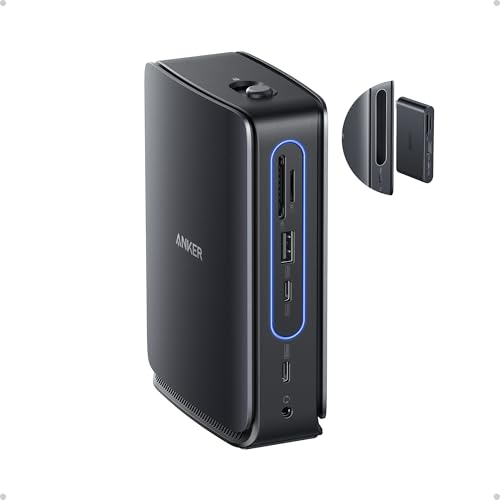
The Anker Nano Laptop Docking Station with Detachable Hub is ideal for professionals and tech enthusiasts who need to expand their laptop connectivity efficiently. If you use a Dell, Lenovo, HP, or other USB-C compatible laptops and require multiple displays and ports for productivity, this docking station is a perfect solution to enhance your workspace.
Pros:
- Supports 13-in-1 USB-C triple display with 2 HDMI and 1 DisplayPort outputs for versatile multi-monitor setups.
- Offers 10 Gbps USB-C data transfer and three USB-A ports, ensuring fast connectivity for peripherals.
- Includes SD and TF card readers for convenient media access.
- Provides 100W Max Power Delivery to charge your laptop efficiently while in use.
- Compact and sleek black design with detachable hub for portability and space-saving.
- Equipped with Ethernet port and audio jack for comprehensive connectivity options.
Cons:
- May require specific driver support for certain laptop models.
- Limited to laptops with USB-C ports, not compatible with older USB-A only devices.
- Detachable hub might add complexity for some users preferring an all-in-one design.
The Anker Nano Laptop Docking Station stands out with its ability to support three external displays simultaneously, which greatly enhances multitasking and productivity for users managing multiple applications or presentations. Its combination of 2 HDMI and 1 DisplayPort outputs caters to diverse monitor configurations, making it a versatile addition to any professional setup.
Beyond display capabilities, this docking station excels with its high-speed data transfer via the 10 Gbps USB-C port and multiple USB-A ports, allowing users to connect external drives, keyboards, mice, and other peripherals seamlessly. The inclusion of an Ethernet port ensures a stable wired internet connection, which is crucial for uninterrupted work sessions. Additionally, the integrated 100W Power Delivery ensures that your laptop remains charged, eliminating the need for additional power adapters and reducing clutter.
To buy this product, click here.
3. Selore Usb C Docking Station Dual Monitor

The Selore USB C Docking Station Dual Monitor is ideal for professionals, remote workers, and tech enthusiasts who require a versatile and efficient solution to expand their laptop’s connectivity. If you own a Windows laptop and need to connect multiple monitors, USB devices, and other peripherals simultaneously, this 14 in 1 docking station offers a comprehensive hub that enhances productivity and workspace organization.
Pros:
- Supports up to 3 monitors with 2 HDMI ports and VGA output for versatile display options
- High-speed data transfer with 10G USB A/C ports and multiple USB A/C connections
- Power delivery up to 100W PD to keep your laptop charged while in use
- Compact and sleek light grey design that complements modern workstations
- Wide compatibility with various Windows laptops and devices
Cons:
- May require driver installation for full functionality on some systems
- Limited color options available, only in light grey
- Performance can vary depending on the laptop’s USB-C port specifications
The Selore USB C Docking Station boasts an impressive array of connectivity options, making it a powerhouse for multitasking. Featuring dual HDMI ports alongside a VGA port, users can effortlessly set up up to three external monitors, enhancing screen real estate for better workflow management. The inclusion of 10G USB A/C ports ensures rapid data transfers, allowing users to connect external drives, peripherals, and accessories without bottlenecks.
Additionally, the docking station supports 100W Power Delivery (PD), which means it can simultaneously power your laptop and connected devices, reducing cable clutter and the need for multiple chargers. The sleek light grey design not only fits aesthetically into professional environments but also offers durable build quality from trusted brands Selore&S-Global. This docking station is truly a multiport adapter designed to enhance productivity and streamline your workspace.
To buy this product, click here.
4. Anker Laptop Docking Station

The Anker Laptop Docking Station is ideal for professionals and tech enthusiasts who require a versatile and efficient workspace setup. If you own a Dell, HP, Lenovo, or other USB-C compatible laptops and need to connect multiple displays and peripherals simultaneously, this 13-in-1 USB-C Docking Station offers an all-in-one solution to enhance productivity and connectivity.
Pros:
- Supports triple display with 2x HDMI and 1x DisplayPort for expanded screen real estate.
- High-speed data transfer with 10 Gbps USB-C and 5 Gbps USB-A ports.
- Provides up to 85W charging to keep laptops powered without extra chargers.
- Includes multiple connectivity options such as Ethernet, audio, and SD card slots.
- Compact and lightweight design (0.82 pounds) suitable for desktop or travel use.
Cons:
- May require compatible USB-C laptops with DisplayPort Alternate Mode support.
- Limited to 3 external monitors, which may not suffice for some multi-display setups.
- Gray color may not match all desktop aesthetics.
The Anker 13-in-1 USB-C Docking Station offers a comprehensive range of ports that cater to various user needs, making it a powerful hub for anyone looking to streamline their workspace. Its ability to support triple displays with dual HDMI and DisplayPort connections enables users to work efficiently across multiple screens, improving multitasking and productivity. The inclusion of both USB-C and USB-A ports ensures compatibility with a wide array of devices, while the high data transfer speeds facilitate quick file exchanges and peripheral connectivity.
Additionally, the docking station delivers up to 85W of power to compatible laptops, eliminating the clutter of multiple chargers and helping maintain a clean workstation. The integrated Ethernet port provides reliable wired internet access, which is essential for stable and fast connections during important work tasks. Overall, the Anker Laptop Docking Station combines functionality, convenience, and portability, making it an excellent choice for users seeking to enhance their laptop experience with a professional-grade docking solution.
To buy this product, click here.
5. Lionwei Usb C Docking Station

The 13 in 1 USB C Docking Station by LIONWEI is ideal for professionals, creatives, and tech enthusiasts who need to expand the connectivity of their laptops or devices. If you own a MacBook, Dell, HP, Lenovo, or Surface and require multiple ports to connect monitors, USB devices, and network cables simultaneously, this docking station is designed for you. It is especially useful for those seeking a seamless multi-display setup and enhanced productivity.
Pros:
- Supports dual monitor and triple display setups for improved multitasking.
- Equipped with 8 USB C/A ports providing extensive connectivity options.
- Includes Ethernet port for stable and fast wired internet connection.
- Compact and lightweight design measuring 13.0 inches in length and weighing just 0.31 pounds.
- Compatible with a wide range of laptops and devices.
- Provides audio output for enhanced multimedia experience.
Cons:
- May require additional adapters for certain display connections depending on monitor type.
- Long length of 13 inches may not be ideal for all workspace setups.
The LIONWEI 13 in 1 USB C Docking Station offers a robust solution for expanding your device’s capabilities. Its multiple ports ensure that you can connect various peripherals including external monitors, USB drives, and network cables without hassle. The ability to support dual and triple monitor displays significantly enhances productivity by allowing users to multitask more efficiently and enjoy immersive viewing experiences.
Designed with portability in mind, this docking station features a sleek black finish and lightweight build, making it easy to carry between home and office. The inclusion of an Ethernet port guarantees reliable internet connectivity, which is crucial for video calls and large file transfers. Overall, it is a versatile accessory that complements modern laptops by turning a single USB-C port into a powerful workstation hub.
To buy this product, click here.
6. Acer Premium 13-in-1 Docking Station

The Acer Premium 13-in-1 Docking Station is ideal for professionals and tech enthusiasts who require a versatile and powerful docking solution for their laptops. Whether you are a remote worker, a graphic designer, or a business user with multiple devices, this docking station is designed to enhance productivity by providing extensive connectivity and robust performance. It is perfect for users of Windows laptops and popular brands such as Dell, HP, Lenovo, and Asus who need to connect multiple monitors and peripherals seamlessly.
Pros:
- Supports triple monitor setup with dual 4K HDMI and DisplayPort for enhanced multitasking.
- Provides 110W Power Delivery (PD) to keep your laptop charged efficiently.
- High-speed data transfer with 5Gbps USB A/C ports for peripherals and storage devices.
- Gigabit Ethernet port ensures stable and fast wired internet connectivity.
- Compact and sleek space grey design that fits neatly on any desk.
- Includes a security lock slot for added device safety.
Cons:
- May be on the pricier side compared to basic docking stations.
- Limited to laptops that support USB-C or Thunderbolt connectivity.
The Acer Premium 13-in-1 Docking Station boasts an impressive range of features that cater to advanced connectivity needs. Its ability to support triple monitors with dual 4K HDMI and DisplayPort outputs allows users to create expansive workspaces, ideal for multitasking and immersive visual experiences. The inclusion of a 110W Power Delivery ensures that your laptop remains charged even during intensive use, eliminating the need for multiple chargers and reducing desk clutter.
Beyond display and power capabilities, this docking station enhances productivity with fast data transfer speeds through its 5Gbps USB A and USB C ports. This means quicker file transfers and seamless connectivity with external drives and peripherals. The Gigabit Ethernet port adds to the reliability of your internet connection, which is crucial for video conferencing, large downloads, or streaming. The compact design in an elegant space grey finish complements any professional setup, while the security lock feature provides peace of mind by protecting your device against theft.
To buy this product, click here.
7. Anker Laptop Docking Station

The Anker Laptop Docking Station, 14 in 1 USB C Hub is ideal for professionals, remote workers, and tech enthusiasts who require seamless multi-display setups and expanded connectivity options for their laptops, especially models like the Dell XPS. If you need to connect multiple peripherals, external displays, and require fast data transfer along with reliable power delivery, this docking station is designed to meet those demands efficiently.
Pros:
- Supports triple display with 2 x 4K HDMI and 1 x 1080p VGA ports for versatile screen setups.
- Provides up to 80W power delivery to keep your laptop charged while connected.
- Includes multiple 5Gbps USB-A and USB-C data ports for high-speed data transfer.
- Compact and lightweight design with sleek grey color that blends well with modern laptops.
- Compatible with a wide range of USB-C laptops beyond Dell XPS, enhancing flexibility.
Cons:
- Charger not included, so users need to ensure they have a compatible power source.
- Some users might find the VGA resolution limited to 1080p compared to HDMI options.
- May require occasional driver updates for optimal compatibility with various operating systems.
The Anker 14 in 1 USB C Hub excels in providing a comprehensive docking solution with its extensive port selection and support for multiple displays. With two 4K HDMI ports and one 1080p VGA port, users can enjoy an immersive and productive multi-monitor environment. This is particularly beneficial for professionals who work with graphic design, video editing, or complex spreadsheets, enabling efficient multitasking across different screens. Its compact form factor and lightweight nature make it easy to carry, perfect for users who frequently move between workspaces.
Beyond display capabilities, the docking station ensures fast and reliable data transfer through its multiple USB-A and USB-C ports with speeds up to 5Gbps. This allows users to connect external drives, peripherals, and accessories without compromising performance. The inclusion of 80W power delivery means your laptop stays powered during heavy usage, reducing downtime and maintaining productivity. Although the charger is not included, the dock’s compatibility with most USB-C laptops and its robust build quality from the trusted Anker brand make it a valuable investment for expanding your workstation’s capabilities.
To buy this product, click here.
8. Anker Prime Docking Station

The Anker Prime Docking Station is perfect for professionals and tech enthusiasts who require a seamless and efficient workspace setup. Ideal for users of Dell, HP, Lenovo, and other compatible laptops, this docking station caters to those who need to connect multiple devices simultaneously while maintaining high-speed data transfer and power delivery. If you are looking to enhance your productivity with reliable connectivity and support for dual 4K displays, this device is an excellent investment.
Pros:
- Supports 14 ports for extensive connectivity options.
- Delivers a powerful 160W max output for charging and powering devices.
- Offers 10Gbps fast data transfer for efficient file management.
- Includes Real-Time Smart Interface for monitoring device status.
- Supports Dual 4K displays enhancing multitasking and visual clarity.
- Provides Audio and Ethernet ports for versatile connectivity.
- Compact dimensions and lightweight design for convenient placement.
Cons:
- May be priced higher than simpler docking stations.
- Compatibility limited to certain laptop brands and models.
Featuring an impressive 14-port design, the Anker Prime Docking Station allows users to connect a variety of peripherals including external monitors, storage devices, and networking components all at once. The inclusion of dual 4K display support is especially beneficial for professionals in creative fields or those who require multiple screens to boost productivity. Additionally, the 10Gbps fast data transfer ensures swift movement of large files, reducing downtime and improving workflow efficiency.
Beyond connectivity, the docking station delivers a robust 160W max power output that efficiently charges and powers connected devices, minimizing the need for multiple chargers. The Real-Time Smart Interface offers users a convenient way to monitor power and connection status, helping to maintain optimal performance. Its compact size and lightweight build make it suitable for both office and home setups, blending functionality with portability.
To buy this product, click here.
Frequently Asked Questions
What Is A Usb-c Laptop Docking Station?
A USB-C laptop docking station expands connectivity by adding multiple ports. It supports video, data, charging, and Ethernet. These docks enhance productivity by connecting dual or triple monitors and peripherals through one USB-C cable.
Which Docking Station Supports Triple Monitor Setups?
Anker Nano and premium 13-in-1 docking stations support triple displays. They offer 2 HDMI and 1 DisplayPort outputs. These docks suit professionals needing multiple screens for multitasking and seamless workflow.
Can These Docks Charge Laptops While Connected?
Yes, most models like Anker and LIONWEI provide Power Delivery (PD). They deliver up to 100W or more to charge laptops during use. This eliminates the need for separate laptop chargers.
Are These Docking Stations Compatible With All Laptop Brands?
Yes, they support popular brands like Dell, HP, Lenovo, MacBook Pro, and more. USB-C standard ensures broad compatibility across Windows and macOS devices. Always check power delivery and port needs.
What Data Transfer Speeds Do These Usb-c Docks Offer?
Docks provide fast data transfer rates up to 10 Gbps on USB-C ports. USB-A ports typically support up to 5 Gbps. This ensures quick file sharing and peripheral connectivity without lag.
Do These Docking Stations Include Ethernet Ports For Wired Internet?
Yes, most docking stations include a 1 Gbps Gigabit Ethernet port. It provides stable, high-speed wired internet connections. Ideal for work environments requiring reliable network access.
Conclusion
Choosing the best USB-C laptop docking station depends on your needs and budget. The options listed offer great features for work and play. They support multiple monitors, fast data transfer, and reliable power delivery. Most models fit popular brands like Dell, HP, Lenovo, and MacBook.
Remember to check compatibility with your laptop before buying. Also, consider the number and type of ports you require daily. A good docking station can simplify your workspace and boost productivity. With the right choice, connecting all your devices becomes easy and efficient.
Take your time to compare specs and prices. This ensures you get the best value for your money. A quality docking station is a smart investment for any laptop user. It keeps you connected and ready for any task.
